Don’t Tell Anyone Blog - How do you simulate an Enigma Machine?
Some time ago I set myself to build a UI that showed how the Enigma encryption machine worked.
A few weeks of coding went by and I had a working web application that made me proud.

he gave me an idea inspiration hit me:
How about a chat application that sends messages encoded by this machine? Imagine sending encrypted messages to someone and seeing how the machine encrypts a decrypts the messages.
In this series I will document the process of designing the application, building it, and my experience doing so. Check the project’s section page in this blog to see all the posts!
This post is all about the machine that inspired the concept and how I simulated it.
Cryptography, Alan Turing, and WWII⌗
The Enigma was a family of cypher devices (machines that encrypt messages), developed by Germany during the 20th century for domestic used, and later adapted and employed by Nazi Germany during World War II for top-secret communication. The movie The Imitation Game (2014) tells the story how non other than Alan Turing and a prodigious team of people managed to cracked its code.


SOMETHING NEEDS TO BE HERE
How to send a secret messages?⌗
How would you send a sensitive message to someone if you wanted to prevent other people from seeing its contents?
In modern times our computers are in charge from securing our communications between devices. But, but the need to prevent prying eyes from seeing certain communications has been around since ancient times. We just need to look at techniques such as the Caesar cipher, used around 2000 years ago by the ancient Romans, and the Vigenère cipher, used in various from since its invention around 1553.
To understand the machines inner workings and the application, we need to define some terms:
- Plaintext is the message or information one wants to send. Also referred to as the message.
- Cyphertext (also spelled ciphertext) is an unintelligible form of the plaintext. Also referred encoded message.
- Encryption is the process of transforming plaintext into cyphertext.
- Decryption is the process of transforming cyphertext into plaintext. It is effectively the reversed operation to encryption.
- Cypher (also spelled cipher) is the pair algorithms used to perform encryption and decryption.
- Key is piece of data (string of characters, numbers, etc) used as part of the input to the cypher when encryption and decryption a message. The cypher could use different keys for encrypting and decrypting messages.
- Broken code is an expression that indicates that a piece of cyphertext can be transformed back into plaintext by a 3rd party.
This terms are not rigorous, but they will suffice. It is all the cryptography you need to know for now.
A machine built to hide secrets during the war⌗
I will explain the design of the machine. However, you could also check this 10-minutes video by Numberphile or this more in-depth video by Jared Owen that includes a 3D animation of the machine working. I highly recommend you to watch it, since it shows the machine in action. You can skip to the next section if are familiar with the machine or watched either.
First, let us examine the core idea at the heart of the machine. Imagine you want to send a secret message. One simple cypher involves the substitution of the letters in the plaintext in a predetermined way. You could create a substitution list and assign every letter to another one:
original letter:  ABCDEFGHIJKLMNOPQRSTUVWXYZ
                  ↓↓↓↓↓↓↓↓↓↓↓↓↓↓↓↓↓↓↓↓↓↓↓↓↓↓
encrypted letter: ZYXWVUTSRQPONMLKJIHGFEDCBA
This example list is just the usual english alphabet, but it is reversed.
With this specific substitution list, the message HELLO would become SVOOL.
To decrypt the message you have to use the list the other way around:
encrypted letter: ZYXWVUTSRQPONMLKJIHGFEDCBA
                  ↓↓↓↓↓↓↓↓↓↓↓↓↓↓↓↓↓↓↓↓↓↓↓↓↓↓
original letter:  ABCDEFGHIJKLMNOPQRSTUVWXYZ
This type of cypher is called substitution cypher, and the list is the key of the cypher. Unfortunately, this cypher is no very secure. Once the list is known the code is broken, but there are other ways of breaking it without it. By using different cryptanalytical techniques, which are beyond the scopes of this post to explain, you can derive the list. Therefore, this implementation of the cypher is not safe.
Now, consider the idea of having one substitution list for every character position in the message.
For the first letter of the message:
ABCDEFGHIJKLMNOPQRSTUVWXYZ
↓↓↓↓↓↓↓↓↓↓↓↓↓↓↓↓↓↓↓↓↓↓↓↓↓↓
ZYXWVUTSRQPONMLKJIHGFEDCBA

For the second letter:
ABCDEFGHIJKLMNOPQRSTUVWXYZ
↓↓↓↓↓↓↓↓↓↓↓↓↓↓↓↓↓↓↓↓↓↓↓↓↓↓
GSVQZOUDLXIPKFNJAWYBEMRHTC

...

For the n-th letter:
ABCDEFGHIJKLMNOPQRSTUVWXYZ
↓↓↓↓↓↓↓↓↓↓↓↓↓↓↓↓↓↓↓↓↓↓↓↓↓↓
UTPGMCIALVYWBEKFZOHJNSQRXD
This is called a polyalphabetic substitution cypher or simply Polyalphabetic cypher.
To encrypt the message TO with this set of lists, we would use the first list to encrypt T and the second one for O, giving us the cyphertext GN.
With one list, every letter is encrypted the same way every time (the two Ls in the previous HELLO example become Os in SVOOL).
The new implementation makes the pattern not evident anymore and this cypher more secure.
Unfortunately, it adds complexity to its implementation, as we need a list for every character in the message.
Imagine how impractical it would be to encrypt and decrypt the text of a tweet, using up to 255 different lists.
This is were our muse comes into the spotlight. The Enigma is in an electro mechanical implementation of a polyalphabetic cypher. It achieved the usage of multiple substitution lists through a series of disks containing wires that connected a keyboard to a lampboard.


Every disk can be though of as a physical substitution list.
They had 26 connectors on either side, corresponding to the 26 letters of the english alphabet, and 26 wires interconnecting terminals from one side of the disk to the other side, so that for example: terminal A on one side connected to terminal S on the other.
The current passed through the rotating disks (a.k.a rotors) and into a special disk called the reflector which made another substitution and send the current back to the rotors in reverse order and through a different path.
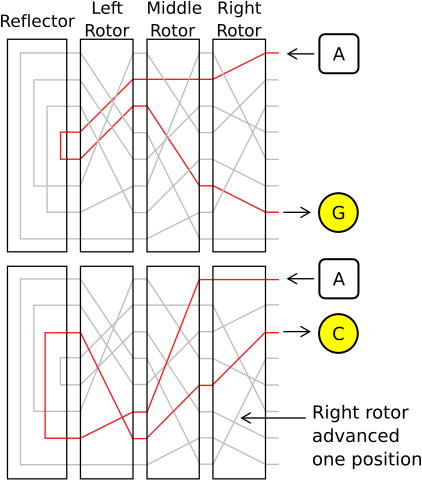

Every time you pressed a key, a lamp with the encrypted equivalent would light up and the disks would move one position, connecting each key to a new lamp after every key-press.
The disks, also called rotors moves like the hands of a clock:
- A Fast rotor that moves on every key-press (like the seconds hand in a clock)
- A Medium rotor that moves once every time the Fast rotor did a full turn (like the minute-hand in a clock)
- A Slow rotor that moves once every time the Medium rotor did a full turn (like the hour-hand in a clock)
To add security, the notch in the rotor that moves the next one was not necessarily on Z.
Every disk had this notch on different positions (like N or V), and it could be shifted to another letter.
The position of the notch was called the setting of the rotor.
In addition to the disks, every military model of the machine had a plugboard. A panel with cables that did not change through the encryption process, but added another substitution list on top of the one provided by the disks, with a lot of possible configurations.


To decrypt a message, you just needed to have the same configuration used for encryption (same connections in the plugboard, same disks, and same initial positions) and type the cyphertext.
The safety of this machine lies not in the process itself, the allied forces even managed to get their hands on multiple machines during the war. It lies in the ludicrous amount of possible settings the machine had. The machines had a set of 5 rotors (8 by the end of the war), 3 reflectors (5 by the end of the war), and 10 cables for the plugboard. The operator could choose any reflector of the 3; choose any 3 rotors from the 5 and put them in any order; start each rotor in one of their 26 positions; and connect up to 20 letter with the cables in the plugboard. This gives a total of more than 20 billion (20,000,000,000) combinations per human being on the planet. Despite this, the cypher can and was broken using cryptoanalysis and a design flaw in the machine.
Simulating encryption the device⌗
My initial idea was to implement a simulation of the machine as a web app that showed it working under the hood.
Specifically, how the current would travel from the input towards the output.
This meant not only recreating the functionality of the machine in code, but also developing a dynamic UI that conveyed all the substitutions that the letters went through.
Also, at this point I had only ever used Vue.js at work and Svelte in a side projects, so I decided to use this opportunity to finally learn React.
It is funny to think that one of fathers of computer science worked to crack this machine during WWII to end it, and here I was replicating said device in a computer.
Irony or not, you have seen the result already:
Now, I will cover the details of simulating the machine. The explanation of implementation using React will come in the next post.
Making the disks and the plugboard⌗
I already told you the first insight required to simulate the machine: It functions as a series of substitution lists connected together. The substitutions are done in this order:
- Plugboard
- Fast Rotor
- Medium Rotor
- Slow Rotor
- Reflector
- Slow Rotor
- Medium Rotor
- Fast Rotor
- Plugboard
The plugboard could leave the letter unchanged if there is no cable connected to its terminal, but we can model that as making a letter map to itself in the substitution list. So, we can model the reflector and plugboard as simple substitution lists.
In javascript, a substitution list can be expressed as a plain object:
const diskSubstitutionList = {
    A: "V",
    B: "C",
    // ...
    Z: "A",
};

function substitute(substitutionList, letter) {
    return substitutionList[letter];
}
console.log(substitute(diskSubstitutionList, "A")); // 'V'
Simulating the movement of the rotors requires another insight: When the rotor moves, the wires inside the rotor are unchanged, but the terminals get their input from a different cable than before.
If the rotor is in position A, the terminal A is connected to the wire that comes from the key A.
After it moves, key A gets connected to the B terminal on the rotor; therefore, the position of the rotor dictates how many positions the terminals of the rotor are shifted.
I will discuss the logic behind updating the rotor’s position later.
To get the best out of this idea, the dictionary is now a map from letter index to letter index:
// The index of the letters starts at zero.
const rotorSubstitutionList = {
    //  A  V
    0: 21,
    //  B  C
    1: 2,
    // ...
    //  Z  A
    25: 0,
};
// a number from 0 to 25
let rotorPosition = 1;

function substituteInRotor(
    rotorSubstitutionList,
    rotorPosition /* 1 */,
    plaintextIndex /* 0 */
) {
    const plaintextShiftedIndex = plaintextIndex + rotorPosition;
    // plaintextShiftedIndex == 0 + 1 == 1
    const cyphertextShiftedIndex = rotorSubstitutionList[inputTerminalIndex];
    // cyphertextShiftedIndex == 2
    const cyphertextIndex = cyphertextIndex - rotorPosition;
    // cyphertextIndex == 2 - 1 == 1

    return cyphertextIndex;
}

// Same as substituteInRotor, but compacted to a single line.
const substituteInRotorCompacted = (
    rotorSubstitutionList,
    rotorPosition,
    plaintextIndex
) => rotorSubstitutionList[plaintextIndex + rotorPosition] - rotorPosition;

const plaintext = "A";
const cyphertext = getLetter(
    substituteInRotor(rotorSubstitutionList, rotorPosition, getIndex(plaintext))
);
console.log(cyphertext); // 'B'
Finally, when the reflector sends back the signal, the rotors get used the other way around, meaning the substitution lists get turned backwards. The simulations needs two different substitution lists for every rotor: one forwards and one backwards.
Using all this pieces, the rough process for encrypting a single letter is:
// The following types demonstrate the shape of the data the `encrypt` function takes
type LetterIndex = number;
type SubstitutionList = Record<LetterIndex, LetterIndex>;

interface Plugboard {
    substitutionList: SubstitutionList;
}

interface Reflector {
    substitutionList: SubstitutionList;
}

interface Rotor {
    position: number;
    forwardsSubstitutionList: SubstitutionList;
    backwardsSubstitutionList: SubstitutionList;
}

// Demonstration of the algorithm for encryption.
function substituteLetterUsingMachine(
    plugboard: Plugboard,
    fastRotor: Rotor,
    mediumRotor: Rotor,
    slowRotor: Rotor,
    reflector: Reflector,
    plaintext
) {
    let letterIndex = getIndex(plaintextLetter);
    // Plugboard
    letterIndex = substitute(plugboard.substitutionList, letterIndex);

    // Rotors
    letterIndex = substituteInRotor(
        fastRotor.forwardsSubstitutionList,
        fastRotor.position,
        letterIndex
    );
    letterIndex = substituteInRotor(
        mediumRotor.forwardsSubstitutionList,
        mediumRotor.position,
        letterIndex
    );
    letterIndex = substituteInRotor(
        slowRotor.forwardsSubstitutionList,
        slowRotor.position,
        letterIndex
    );

    // Reflector
    letterIndex = substitute(reflector.substitutionList, letterIndex);

    // Rotors
    letterIndex = substituteInRotor(
        slowRotor.backwardsSubstitutionList,
        slowRotor.position,
        letterIndex
    );
    letterIndex = substituteInRotor(
        mediumRotor.backwardsSubstitutionList,
        mediumRotor.position,
        letterIndex
    );
    letterIndex = substituteInRotor(
        fastRotor.backwardsSubstitutionList,
        fastRotor.position,
        letterIndex
    );

    // Plugboard
    letterIndex = substitute(plugboard.substitutionList, letterIndex);

    return getLetter(letterIndex);
}

const plaintextLetter = "A";
const cyphertextLetter = substituteLetterUsingMachine(
    plugboard,
    fastRotor,
    mediumRotor,
    slowRotor,
    reflector,
    plaintextLetter
);
This algorithm does all the substitutions, but has one flaw. It is still missing the most important feature of the machine: The movement.
Making the rotors move⌗
As explained before, the rotors work like a clock:
- Each part (rotors or hands in clock) has a finite cycle that loops over (it goes from 0 to 25 and then starts over).
- Every time one of parts reaches a specific position, the next part moves.
The difference is that the turning positions at which they reset and the next part moves are not the same. In a clock, the minute hand moves once the seconds hand goes from 60 to 1. On the other hand, the every rotor has the notch that indicates when next one would move in a different position. This is enough to write a functions that moves the pieces one position.
interface Rotor {
    position: number;
    // The setting says if the position of the notchPosition has been moved.
    // It is a number from 0 to 25, describing how many positions forward the notch has been shifted.
    setting: number;
    notchPosition: number;
    forwardsSubstitutionList: SubstitutionList;
    backwardsSubstitutionList: SubstitutionList;
}

const rotors: Rotor[] = [fast, medium, slow];
const ALPHABET_LENGTH = 26;

function addToPosition(position: number, add = 1) {
    return (position + add) % ALPHABET_LENGTH;
}

function moveOnePosition(rotors: Rotor[]) {
    let currentRotor = 0;
    do {
        let rotor = rotors[currentRotor];
        let newPosition = addToPosition(rotor.position, 1);

        rotor.position = newPosition;

        if (addToPosition(rotor.notch, rotor.setting) != position) {
            break;
        }

        currentRotor++;
    } while (currentRotor < rotors.length);
}
For the final insight needed to simulate the machine, I will postulate a question:
Does the rotors move before or after the letter is encrypted?
On my first prototype, I implemented all the functionality up to this point and looked up the original wirework of the rotors and reflector.
During said research, I found a note stating that given certain rotors, positions, and settings the input AAAAA should produce BDZGO, and I could not get that result.
It took me an embarrassingly long time to realize that the rotation should take place after a key is pressed and before the letter passes through the disks.
My final encryption algorithm has the structure:
interface Machine {
    plugboard: Plugboard;
    reflector: Reflector;
    fastRotor: Rotor;
    mediumRotor: Rotor;
    slowRotor: Rotor;
}

function encrypt(machine: Machine, plaintextLetter: string) {
    moveOnePosition([
        machine.fastRotor,
        machine.mediumRotor,
        machine.slowRotor,
    ]);

    return substituteLetterUsingMachine(
        machine.plugboard,
        machine.fastRotor,
        machine.mediumRotor,
        machine.slowRotor,
        machine.reflector,
        plaintextLetter
    );
}

const plaintextLetter = "A";
const cyphertextLetter = encrypt(plaintextLetter);
Final words⌗
My first implementation of encryption worked using this principles. To test that the encryption and decryption worked consistently, I used multiple texts, including the my favorite introspection about our existence, found in the book Pale Blue Dot by Carl Sagan. I found no further bugs.
As a final note, you might realized that I did not mention how the machine handles whitespaces, numbers, or punctuation, since the device has no more than 26 keys, and the reason is that this symbols were not meant to be encrypted. During the war, numbers were spelled out and all other symbols were replaced in various ways with letters if needed. This meant the messages were harder to read after being decrypted, but adding separation in the encrypted version gave information about the structure of the underlying message (you can see how many words are in the message and how many letters are in every words) which makes it easier to break the code, and therefore was not desired. However, the application does (as of now) handle special characters by passing them as-is. After all, the point is to show the amazing inner-workings of the machine and not to actually hide messages with it. I would still let computers and experts handle real-life encryption.
Until the next entry, Keep Coding!